
DeepSeek - AI Assistant
DeepSeekProductivity
3.77.34K Reviews
- Version
- 2.8.0
- Installs
- 100.00M
- Age Rating
- Teen
Screenshots
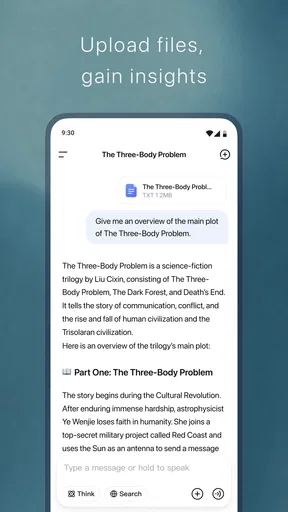
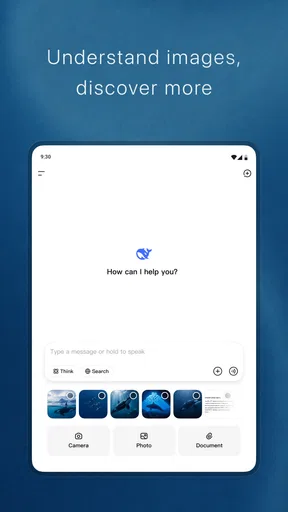
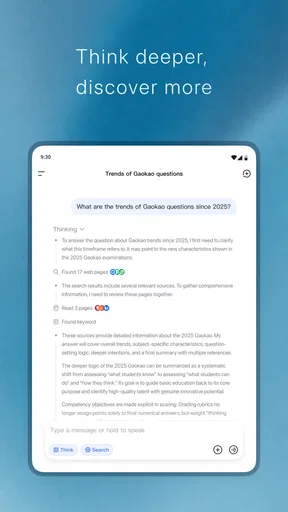
Our Review of DeepSeek - AI Assistant
 Analysis by Appyee
I spent time using DeepSeek as a general-purpose productivity assistant, and my first impression is that it is most useful when I treat it as a thinking partner rather than a search box. It can help me turn a rough idea into a clearer plan, explain a difficult subject in simpler language, rewrite text, and organize the next steps in a task. That makes it appealing for students, office workers, freelancers, and anyone who regularly starts with an empty page.
DeepSeek is developed by DeepSeek and belongs to the productivity category. It is free to download and use, which immediately changes the value calculation: there is no purchase decision to make before trying it. The app carries a Teen age rating, runs on Android devices using version 6.0 or later, and its current release is version 2.4.2. It was released on January 8, 2025, and has already passed 50 million installs, with an average rating of 4.0 from around 320 thousand ratings.
How DeepSeek fits into everyday work
The most natural way to use DeepSeek is to give it a job with a clear outcome. Instead of typing “help me with work,” I get better results from a request such as “turn these meeting notes into five action items, keep the tone neutral, and mark anything that needs a decision.” The difference is important. The app becomes more useful when I provide context, audience, limits, and the format I want back.
I also found it helpful for the awkward middle stage of a task. When I know roughly what I want but cannot organize it, I can ask for an outline, a checklist, or several possible approaches. I do not have to accept the first answer. Asking it to make the explanation shorter, use plainer language, challenge an assumption, or present the same idea as a table gives me a practical editing loop.
That workflow is more valuable than simply asking for finished text. A generated answer may sound polished while still missing the point, so I use the response as a draft that needs my judgment. The real productivity gain comes from reducing the time spent getting started, not from handing over responsibility for the final decision.
A realistic workday example
Imagine I have a busy morning with a long email thread, scattered notes, and a presentation due later. I can paste the relevant material into a conversation and ask DeepSeek to separate confirmed facts, open questions, and proposed actions. After that, I can request a concise presentation outline, followed by speaker notes written in a more conversational voice.
The useful part is the sequence. The first request creates order, the second creates structure, and the third adjusts the result for a real audience. I would still check names, dates, figures, and commitments before sending anything, but the app can remove much of the mechanical sorting. This is a stronger use case than asking it to produce a complete presentation without background.
For personal planning, I can use the same approach. A vague goal such as “get better at studying” becomes more actionable when I provide available time, the subject, the exam date, and the areas I find difficult. DeepSeek can then help me divide the work into sessions and suggest questions for self-testing. The plan is only useful if it matches my actual schedule, so I treat its suggestions as a starting point rather than an authority.
Where the conversation style helps
The conversational format is especially convenient when my request changes while I am working. I can begin with a broad explanation, then ask for an example, a shorter version, or a version aimed at a beginner. That is less frustrating than repeatedly rewriting a full search query. It also makes the app suitable for brainstorming, because I can ask it to generate alternatives and then compare them in the same thread.
One technique I recommend is to ask for criticism before asking for polish. If I am preparing a proposal, I first ask DeepSeek to identify unclear assumptions, missing evidence, and likely objections. Only after addressing those points do I ask for a cleaner version. This produces a more useful result than immediately requesting a persuasive rewrite, because it exposes weaknesses before they become hidden behind fluent wording.
Another practical technique is to define what the assistant should not do. I might ask it to preserve technical terms, avoid inventing references, keep the original meaning, or clearly label suggestions. These boundaries make the response easier to review. They also remind me that a confident tone is not proof that every statement is correct.
Value from a free assistant
Because DeepSeek is free, its strongest value is accessibility. I can test it for a small task without committing money, and a casual user can keep it available for occasional writing, planning, or learning needs. That matters for people who do not need an assistant every day and would not justify paying for a separate productivity service.
The free price also makes experimentation easier. I can try different prompt styles, compare a short answer with a detailed one, and decide whether the app actually improves my routine. There is no need to build my entire workflow around it on the first day. I can begin with low-risk tasks such as outlining, summarizing my own notes, or generating practice questions.
At the same time, free access should not be confused with guaranteed professional value. If an answer saves me ten minutes but introduces an error that takes an hour to find, the result is negative. The app is most worthwhile when I use it for acceleration and preparation, while keeping final control over sensitive, factual, or high-consequence work.
Its scale is also notable: DeepSeek has received around 6.8 thousand written reviews in addition to its broader rating activity. That gives the app a substantial public footprint, but popularity alone does not tell me whether it fits my particular workflow. I care more about how consistently it handles my own prompts than about how many people have installed it.
Important tradeoffs before relying on it
The biggest limitation is the need to verify answers. AI assistants can present a neat explanation even when the reasoning is incomplete or a detail is wrong. I would not use DeepSeek as the sole basis for medical, legal, financial, academic-integrity, or safety-critical decisions. In those situations, it can help me prepare questions or understand terminology, but qualified sources and professionals should remain central.
There is also a quality tradeoff between speed and context. A short prompt is convenient, but it often produces a generic answer. A detailed prompt usually gives me something more relevant, yet preparing that context takes time. The app saves effort when it transforms material I already have; it saves less when I expect it to understand an unspoken goal.
Long conversations can create another kind of friction. As a thread grows, earlier details may become less useful to the immediate task, and I may need to restate the key constraints. I find it cleaner to start a fresh conversation when the goal changes substantially, then include a compact summary of the information that still matters. This prevents an old instruction from influencing a new answer.
Privacy deserves practical attention even without turning the app into a technical policy discussion. I avoid pasting passwords, private identification details, confidential client material, or anything I would not want copied into a third-party service. For work documents, I remove names and unnecessary personal details before asking for help. That habit is sensible with any online AI assistant, including this one.
DeepSeek is also not automatically the best alternative for every task. A dedicated note-taking app is usually better for storing, tagging, and retrieving personal records. A standard search engine is preferable when I need direct sources and current webpages rather than a generated explanation. A traditional office suite remains stronger for precise document formatting, spreadsheet formulas, and collaborative editing. DeepSeek complements those tools; it does not replace all of them.
Small workflows that reveal its strengths
One useful workflow is “draft, challenge, compress.” I ask DeepSeek for a first structure, then request the strongest objections to it, and finally ask for a concise revision that addresses those objections. This is valuable for proposals, study notes, and project plans because it introduces a review stage that I might otherwise skip.
A second workflow is converting messy material into decisions. I can provide a collection of notes and ask for three separate outputs: facts, assumptions, and questions requiring confirmation. That separation is more useful than a single summary when I am preparing for a meeting. It helps me notice where I am treating an opinion as if it were established information.
A third workflow is using role and audience deliberately. Instead of asking for “a better email,” I specify that the recipient is a busy colleague, the tone should be friendly but direct, and the request should appear in the first paragraph. Then I ask DeepSeek to preserve the actual commitment and remove unnecessary background. This gives me control over the communication rather than accepting an overly polished but vague message.
For learning, I prefer asking for questions before explanations. I can request a short quiz on a topic, answer in my own words, and then ask DeepSeek to point out gaps. This encourages active recall. Still, I check important definitions against a textbook, teacher, or authoritative reference, because an AI-generated correction can also be mistaken.
Who will get the most value
I would recommend DeepSeek to people who frequently write, plan, study, or reorganize information but do not need a specialized tool for every step. Students can use it to turn lessons into practice prompts. Freelancers can use it to structure briefs and clarify client questions. Office workers can use it to prepare agendas, rewrite internal messages, and break large assignments into smaller actions.
It is also a good fit for someone who feels blocked at the beginning of a task. The ability to ask for several starting points can make a blank document less intimidating. The benefit is strongest when I remain an editor: I select the useful parts, correct inaccuracies, and adapt the result to the real situation.
I would be more cautious about recommending it to users who want a fully autonomous system. If someone expects every answer to be current, sourced, perfectly accurate, and ready to send without checking, this app will likely disappoint. It is also not the right primary tool for people whose main need is structured project management, advanced document layout, or source-first research.
My verdict on downloading it
DeepSeek offers a convincing amount of practical value at no cost, especially for people who want help turning rough thoughts into organized work. Its best qualities appear in iterative conversations: outline an idea, inspect its weaknesses, refine the language, and convert the result into an actionable format. That process feels genuinely useful rather than merely entertaining.
The tradeoff is responsibility. I need to check factual claims, protect sensitive information, and give the assistant enough context to avoid generic output. Users who accept those conditions can gain a flexible helper for everyday productivity. Users who want a dependable source of truth or a complete replacement for established work tools should choose something else, or use DeepSeek only as one part of a broader setup.
With an average rating of 4.0 and more than 50 million installs, it is clearly attracting serious attention, but my recommendation is based on how it fits a workflow rather than on popularity. Since it is free, trying it is an easy decision for Android users meeting the minimum system requirement. I would download it, begin with low-risk tasks, and judge it after a week of deliberate use. My buy-or-skip verdict is simple: choose it if you want a free conversational productivity partner and are willing to review its work; skip it if you need guaranteed accuracy, source-based research, or specialized document tools first.
Privacy and Permissions
See what permissions an app requests and how it handles your data.
- Photos/Media/Files
- read the contents of your USB storage, modify or delete the contents of your USB storage
- Storage
- read the contents of your USB storage, modify or delete the contents of your USB storage
- Camera
- take pictures and videos
- Microphone
- record audio
- Wi-Fi connection information
- view Wi-Fi connections
- Other
- view network connections, pair with Bluetooth devices, change network connectivity, connect and disconnect from Wi-Fi, full network access, change your audio settings, Google Play license check
Verdict
Strengths of DeepSeek - AI Assistant
- Strong reasoning for coding, math, and technical questions.
- Supports long conversations and detailed follow-up prompts.
- Useful for summarizing, rewriting, and organizing information.
- Clean interface makes starting a new chat straightforward.
- Can provide alternative explanations when the first answer is unclear.
Limitations of DeepSeek - AI Assistant
- Responses may occasionally include confident but inaccurate details.
- Availability and performance can vary during periods of high demand.
- Privacy expectations may differ from other mainstream AI assistants.
- Some answers require careful fact-checking before professional use.
- Advanced features and model access may change between app versions.
Similar Picks in This Category
View All
Google Calendar
Google LLC4.6

Google Drive
Google LLC4.3

Google Assistant
Google LLC3.9

Microsoft OneDrive
Microsoft Corporation4.6

Samsung Calendar
Samsung Electronics Co., Ltd.4.1

Microsoft OneNote: Save Notes
Microsoft Corporation4.6
Frequently Asked Questions
What is DeepSeek – AI Assistant, and what can I use it for?
DeepSeek – AI Assistant is an artificial intelligence chatbot designed to answer questions, explain complex topics, summarize text, help with writing, translate content, generate ideas, and assist with programming tasks. In everyday use, it works much like a conversational search and productivity tool. You can ask follow-up questions to refine an answer, although important facts should still be checked against reliable sources.
Is DeepSeek – AI Assistant free to download and use?
The app can generally be downloaded without an upfront purchase, but availability, account requirements, usage limits, and optional features may vary depending on the platform and region. Some functions may be affected by server capacity or service policies. Before relying on it for frequent or professional use, review the current pricing information, limits, and terms shown in the official Google Play Store or Apple App Store listing.
Does DeepSeek – AI Assistant require an internet connection?
Yes, DeepSeek primarily depends on an internet connection because requests are processed through online servers rather than entirely on your phone. A stable Wi-Fi or mobile-data connection usually provides the smoothest experience, especially for longer conversations or complex prompts. If your connection is weak, responses may be delayed, fail to load, or become unavailable until the service reconnects.
Can I trust DeepSeek’s answers for school, work, or important decisions?
DeepSeek can be useful for brainstorming, drafting, learning, coding assistance, and organizing information, but its responses should not be treated as automatically correct. Like other AI assistants, it may misunderstand a question, provide outdated information, or confidently produce inaccurate details. Verify citations, calculations, medical guidance, legal information, financial recommendations, and other high-impact answers with qualified or authoritative sources.
Is my information private when I use DeepSeek – AI Assistant?
Before entering personal, confidential, financial, medical, workplace, or proprietary information, read the app’s current privacy policy and data-handling settings. Conversations may be transmitted to service infrastructure to generate responses, and available controls can differ between versions or regions. For safer use, avoid sharing passwords and sensitive identifiers, review permissions carefully, and delete conversations or account data where the app provides those options.
